Understand AI scoring
Spheric uses AI to evaluate candidates based on the criteria and thresholds defined for your role.
Spheric uses AI to evaluate candidates based on the criteria and thresholds defined for your role.
Each candidate is scored across multiple dimensions to help you quickly identify the best fit.
How AI scoring works
During the hiring process, candidates are evaluated at different stages:
- Resume and profile screening
- Intake form responses
- AI interview or technical challenge
At each step, the system assigns scores based on your predefined criteria.
What is evaluated
During the screening and interview process, candidates are evaluated across multiple dimensions:
Work experience
Evaluates the relevance and depth of the candidate’s professional background.
The AI analyzes previous roles and responsibilities, years of experience, and alignment with the role requirements.
Job reliability
Assesses the candidate’s career stability and consistency.
The AI looks at job tenure, frequency of job changes, and career progression over time.
Educational background
Reviews the candidate’s academic history.
The AI considers the level of education, field of study, and relevance to the role.
Primary skill match
Measures how well the candidate’s core skills align with the role.
The AI evaluates key skills listed in the resume, match with role requirements, technical or functional expertise.
English fluency
Evaluates the candidate’s ability to communicate in English.
The AI analyzes clarity of responses, vocabulary, grammar, and overall communication effectiveness.
Timezone match
Checks whether the candidate’s location aligns with the role’s requirements.
The AI considers the candidate’s location and time zone compatibility with the role.
How scoring works
- Each category is evaluated individually
- Scores are assigned based on how well the candidate meets the criteria
- These scores contribute to the overall candidate evaluation
Candidates are then classified as:
- Low match
- Moderate match
- Good match
- Great match
Where to see scores
You can view scoring in:
- The Applicant Board (by stage)
- The applicant card (detailed breakdown)
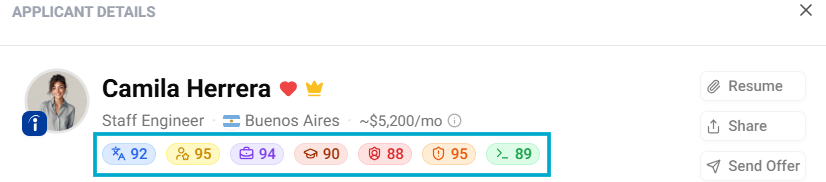
Click on each threshold to see:
- The candidate’s score
- A brief summary of their evaluation
How to use AI scoring
- Quickly identify top candidates
- Compare applicants consistently
- Focus your time on the best matches