Analytics overview
The Analytics section shows the time saved and efficiency gains generated by using Spheric.
The Analytics section shows the time saved and efficiency gains generated by using Spheric.
Instead of traditional metrics, this view highlights how much manual work has been automated across your hiring process.
What you’ll see
In this section, you’ll find a summary of:
- Total time saved
- Tasks automated by Spheric
- Hiring activity breakdown
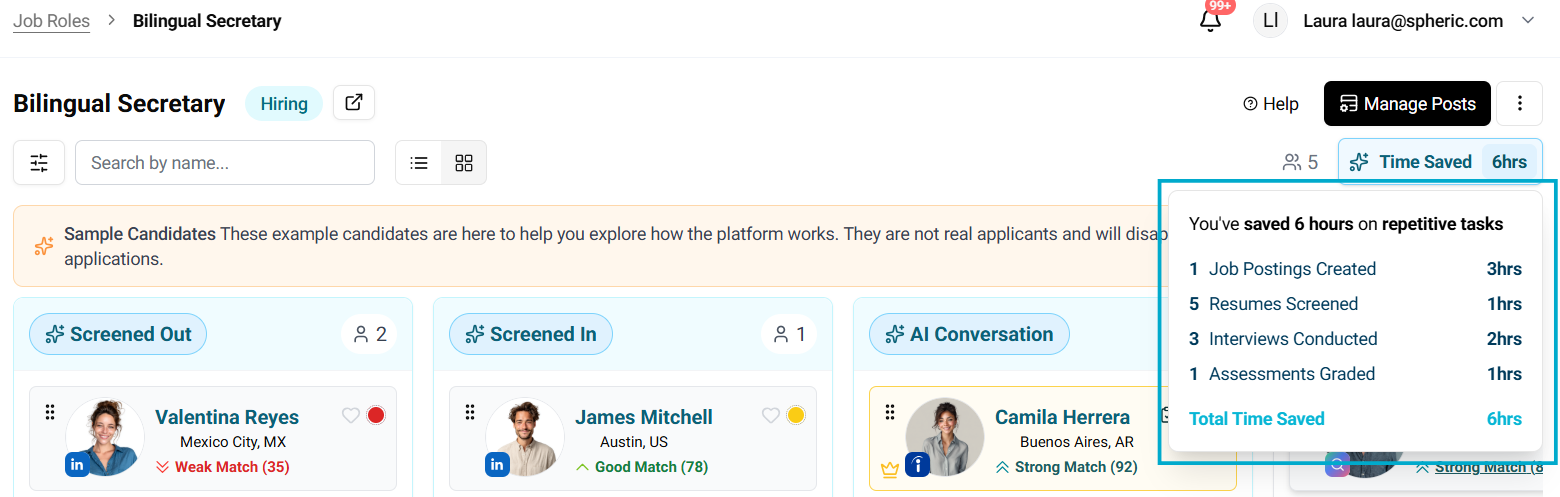
Time saved breakdown
Spheric calculates the time saved based on key hiring actions:
- Job postings created → Time saved from manual job setup
- Resumes screened → Time saved from manual CV review
- Interviews conducted → Time saved from initial screening calls
- Assessments graded → Time saved from evaluating candidates
Each action shows the estimated hours saved.
Total time saved
At the top of the section, you’ll see the total time saved, which represents the cumulative efficiency gained across all automated tasks.
This helps you understand the overall impact of using Spheric.
How to use this data
Use this section to:
- Measure efficiency improvements
- Understand how much manual work is being reduced
- Communicate ROI to your team or stakeholders
What happens next
As you continue using Spheric:
- More actions will be tracked
- Your total time saved will increase
- You’ll gain better visibility into your hiring efficiency